Attributed String Creator
Style text the way you want it to look in your app, and get the NSAttributedString code that builds it. Swift or Objective-C, for iOS or macOS.
 $9.99 · £9.99 · Buy once, no subscription
- Swift
- Objective-C
- UIKit
- AppKit
How it works
Format it. Copy the code.
Writing attributed strings by hand means counting characters and declaring every font and colour yourself. Attributed String Creator writes that code while you format the text, and keeps it up to date with every change.
- Bring in your textType it, paste it, or open an RTF, Word or text file. The code appears straight away.
- Format it like any Mac textFonts, sizes, bold, alignment and spacing, from the format bar, the Fonts panel or the Format menu.
- Colour it inEvery colour, underline and strikethrough gets declared, with the exact range it covers.
- Swift or Objective-COne click switches the language.
- iOS or macOSGet
UIFontandUIColor, orNSFontandNSColor. - Variable or methodName it, and wrap it in a function if you like.
- Copy the codePaste it into Xcode and assign it to a label, a text view or a button.
The code
Code you'd write yourself
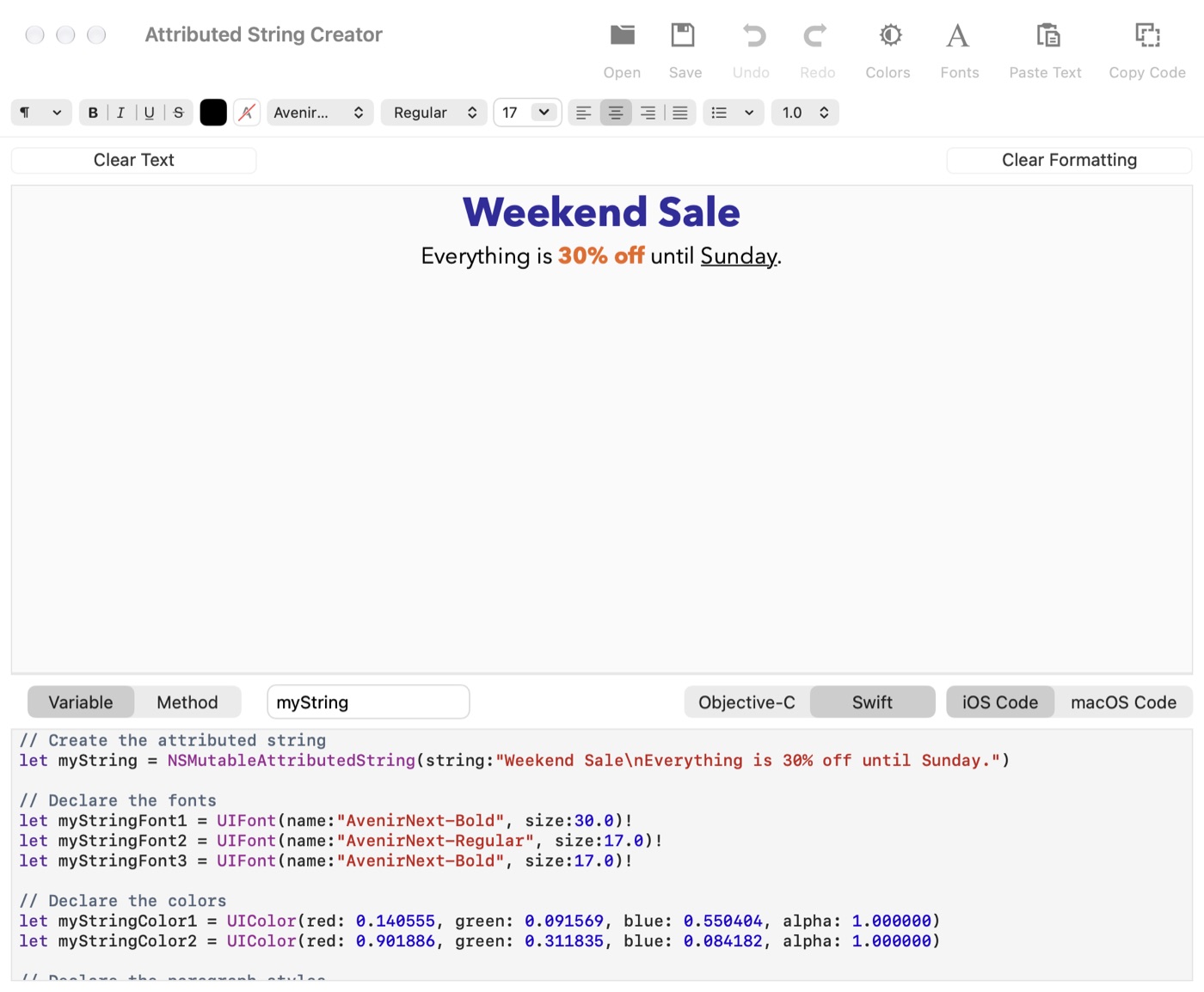
This is the code Attributed String Creator made for the sale banner above, exactly as it came out of the app.
// Create the attributed stringlet myString = NSMutableAttributedString(string:"Weekend Sale\nEverything is 30% off until Sunday.") // Declare the fontslet myStringFont1 = UIFont(name:"AvenirNext-Bold", size:30.0)!let myStringFont2 = UIFont(name:"AvenirNext-Regular", size:17.0)!let myStringFont3 = UIFont(name:"AvenirNext-Bold", size:17.0)! // Declare the colorslet myStringColor1 = UIColor(red: 0.140555, green: 0.091569, blue: 0.550404, alpha: 1.000000)let myStringColor2 = UIColor(red: 0.901886, green: 0.311835, blue: 0.084182, alpha: 1.000000) // Declare the paragraph styleslet myStringParaStyle1 = NSMutableParagraphStyle()myStringParaStyle1.alignment = NSTextAlignment.center // Create the attributes and add them to the stringmyString.addAttribute(NSAttributedString.Key.foregroundColor, value:myStringColor1, range:NSRange(location: 0, length: 13))myString.addAttribute(NSAttributedString.Key.paragraphStyle, value:myStringParaStyle1, range:NSRange(location: 0, length: 13))myString.addAttribute(NSAttributedString.Key.font, value:myStringFont1, range:NSRange(location: 0, length: 13))myString.addAttribute(NSAttributedString.Key.paragraphStyle, value:myStringParaStyle1, range:NSRange(location: 13, length: 14))myString.addAttribute(NSAttributedString.Key.font, value:myStringFont2, range:NSRange(location: 13, length: 14))myString.addAttribute(NSAttributedString.Key.foregroundColor, value:myStringColor2, range:NSRange(location: 27, length: 7))myString.addAttribute(NSAttributedString.Key.paragraphStyle, value:myStringParaStyle1, range:NSRange(location: 27, length: 7))myString.addAttribute(NSAttributedString.Key.font, value:myStringFont3, range:NSRange(location: 27, length: 7))myString.addAttribute(NSAttributedString.Key.paragraphStyle, value:myStringParaStyle1, range:NSRange(location: 34, length: 14))myString.addAttribute(NSAttributedString.Key.font, value:myStringFont2, range:NSRange(location: 34, length: 14))
- Declared once, used everywhereEach font, colour and paragraph style gets one variable, named after your string, however many times the text uses it.
- Grouped and in orderFonts, then colours, then paragraph styles, then the attributes. Change a size or a colour in one place.
- Exact rangesEvery attribute is added with the range it covers, so nothing needs counting. Or turn on Declare variables with rangeOfString in the Options menu and the ranges are found by searching the text instead.
- Defaults left outParagraph styles only set what you changed. Verbose Paragraph Properties declares the lot, and you choose whether tab stops are included.
Features
Everything rich text can do
- Fonts and sizesAny font on your Mac, at any size and weight. The code names each one exactly as
UIFontandNSFontexpect. - Colours and highlightsText colours, background colours, underlines and strikethroughs, each with its own colour.
- Paragraph stylesAlignment, indents, line spacing and tab stops, collected into as few paragraph styles as the text needs.
- LinksLinked text comes out with its URL attached, ready for a text view.
- Text from anywhereType, paste, or open RTF, Word (.docx), HTML and plain text files. Save your formatted text as RTF to come back to it.
- Four kinds of codeSwift or Objective-C, for iOS or macOS, as a variable or a method. The code changes the moment you switch.
Fonts
Warns you about missing fonts

Not every Mac font is on iOS
Attributed String Creator knows which fonts come with iOS. If your text uses one that doesn't, it tells you which, and gives you the exact name to use once you've added the font to your app.
A look inside
Your text above, your code below
Light or dark, it follows your Mac's appearance.
Swift for iOS, as a variable 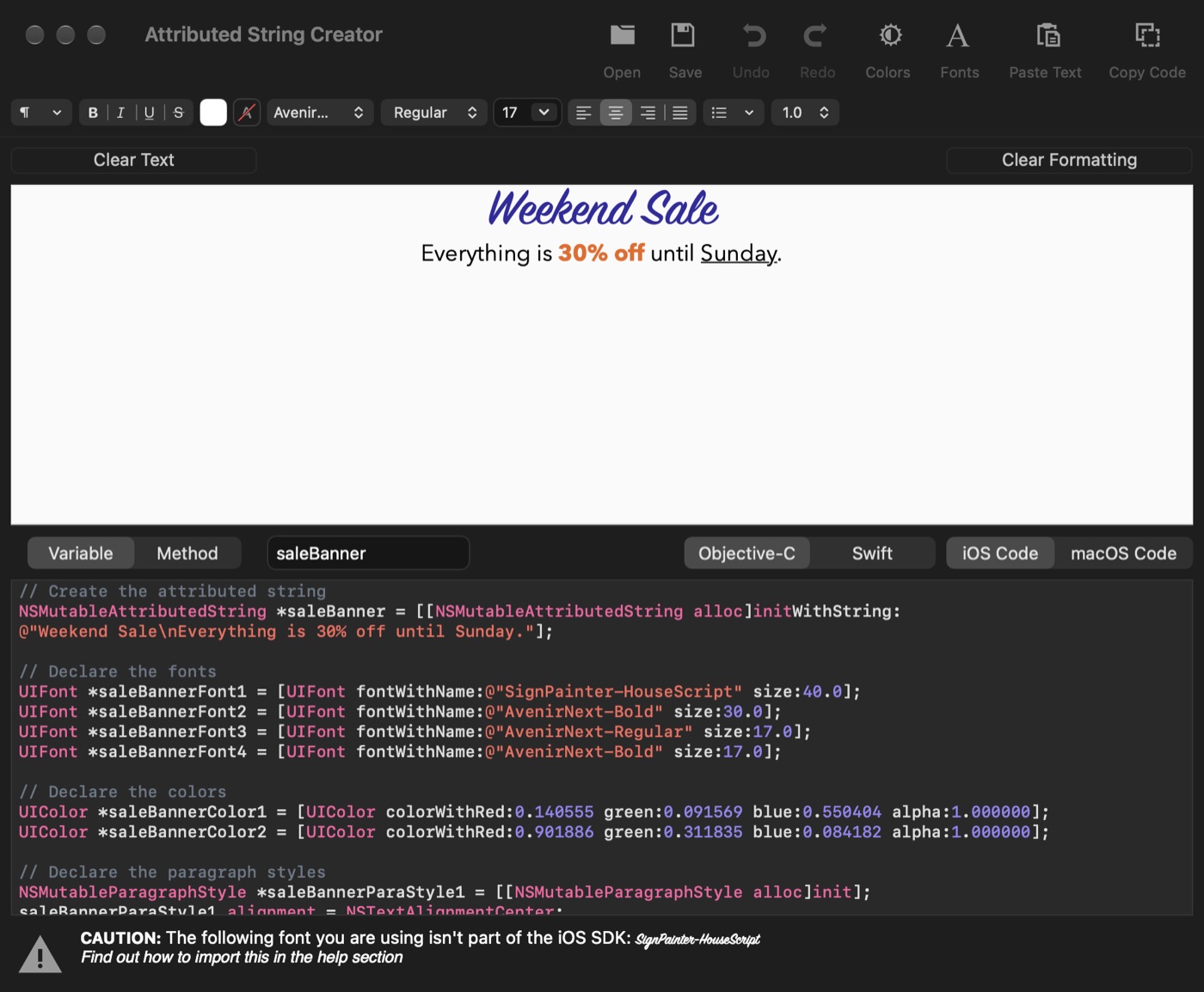
Objective-C, with a font iOS doesn't have
Get it
Buy it once
Attributed String Creator Pro
$9.99 · £9.99, a one-off purchase
- No subscription and no limits
- Swift and Objective-C, for iOS and macOS
- Free updates through the Mac App Store
Want to try it first? The free version works on up to 40 characters at a time.
 Formatting dates too? Date Format Creator builds date format strings for Swift and Objective-C. See Date Format Creator →
Details
- Works onMacs with macOS 11 Big Sur or later
- Version1.9.11, December 2024
- Price$9.99 (£9.99), a one-off purchase
- WritesSwift or Objective-C, using
NSMutableAttributedString, for UIKit or AppKit - OpensRTF, Word (.docx), HTML and plain text files
- Size4.3 MB
- Made byBridgeTech Solutions, in the UK